
What is hackathon judging software?
Hackathon judging software is a tool that lets a panel of mentors, sponsors, and investors score hackathon projects on shared criteria (technical execution, originality, impact, presentation) from their own laptops or phones, and produces a live, transparent ranking. It replaces the post-demo Google Sheet and the panicked tally before the awards ceremony.
Hackathons are the canonical multi-judge competition. A panel of five to fifteen people, twenty to fifty teams, four-minute demos, and a thirty-minute window between the last pitch and the awards. Whatever you use to score has to keep up with that, handle criteria that carry different points, and survive a sponsor judge who has never seen the spreadsheet before.
Purpose-built judging software handles all of it: judge onboarding via a link, multi-criteria scoring with per-criterion points, live leaderboard for the demo room, and a defensible per-judge breakdown if anyone questions the result. For background on the broader category, see what is judging software.
How it works
Setting up hackathon judging takes about ten minutes. The math runs itself once the demos start.
- Create the hackathon Add the teams (or projects), and decide how many judges will score them. Five to ten judges is typical for student and corporate hackathons; large public events sometimes have fifteen or more.
- Define the scoring criteria Add criteria like technical execution, originality, impact, and presentation. Give each criterion its own maximum — technical execution can be worth more points than presentation.
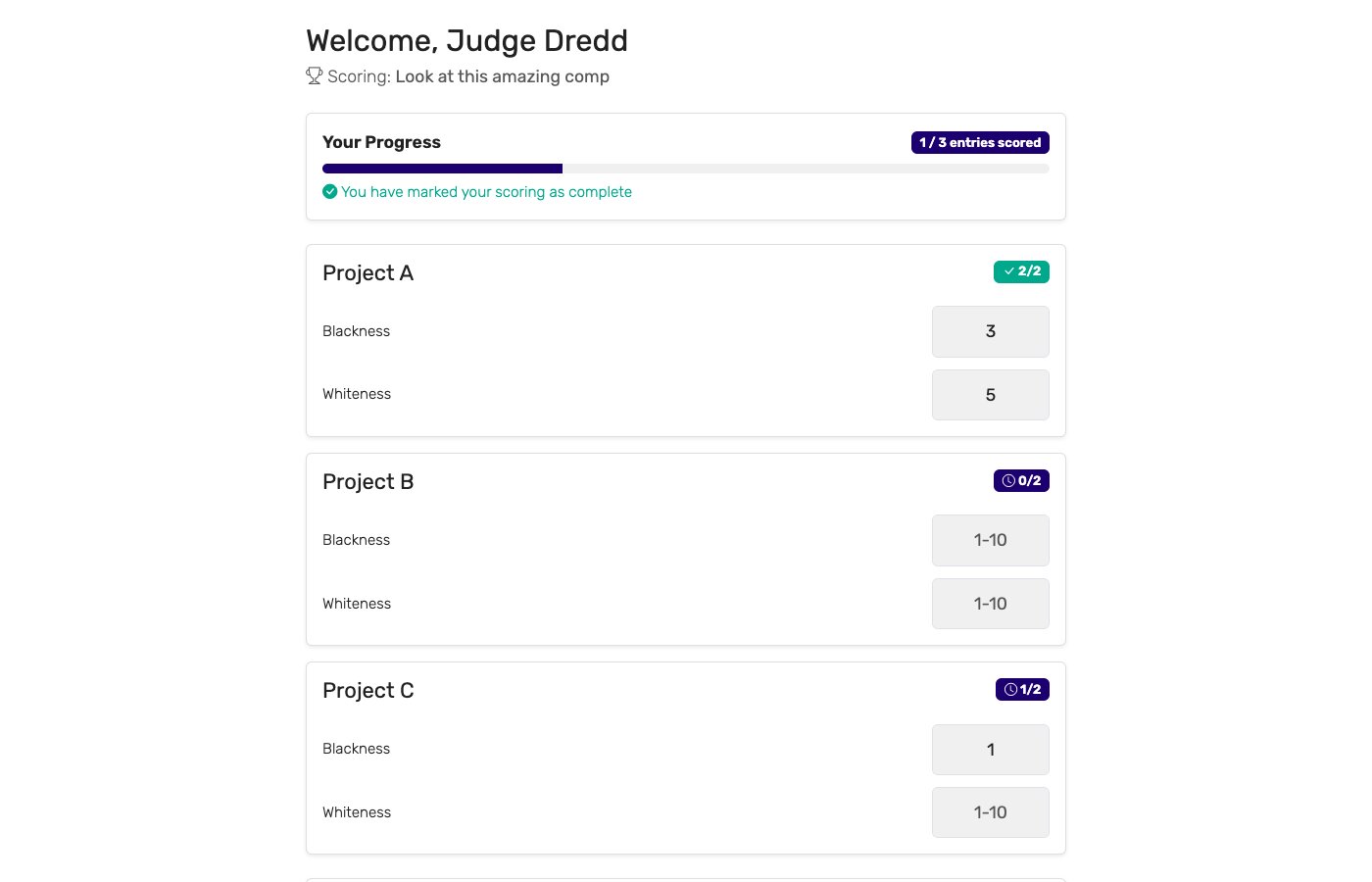
- Send judges their private links Each judge gets a unique link. They open it on a laptop, tablet, or phone — no account, no install. They see one team at a time with score inputs for each criterion.
- Judges score during the demos As each team finishes their demo, the judges score them and submit. The leaderboard updates live. Optional: drop the highest and lowest score per project to reduce outlier bias.
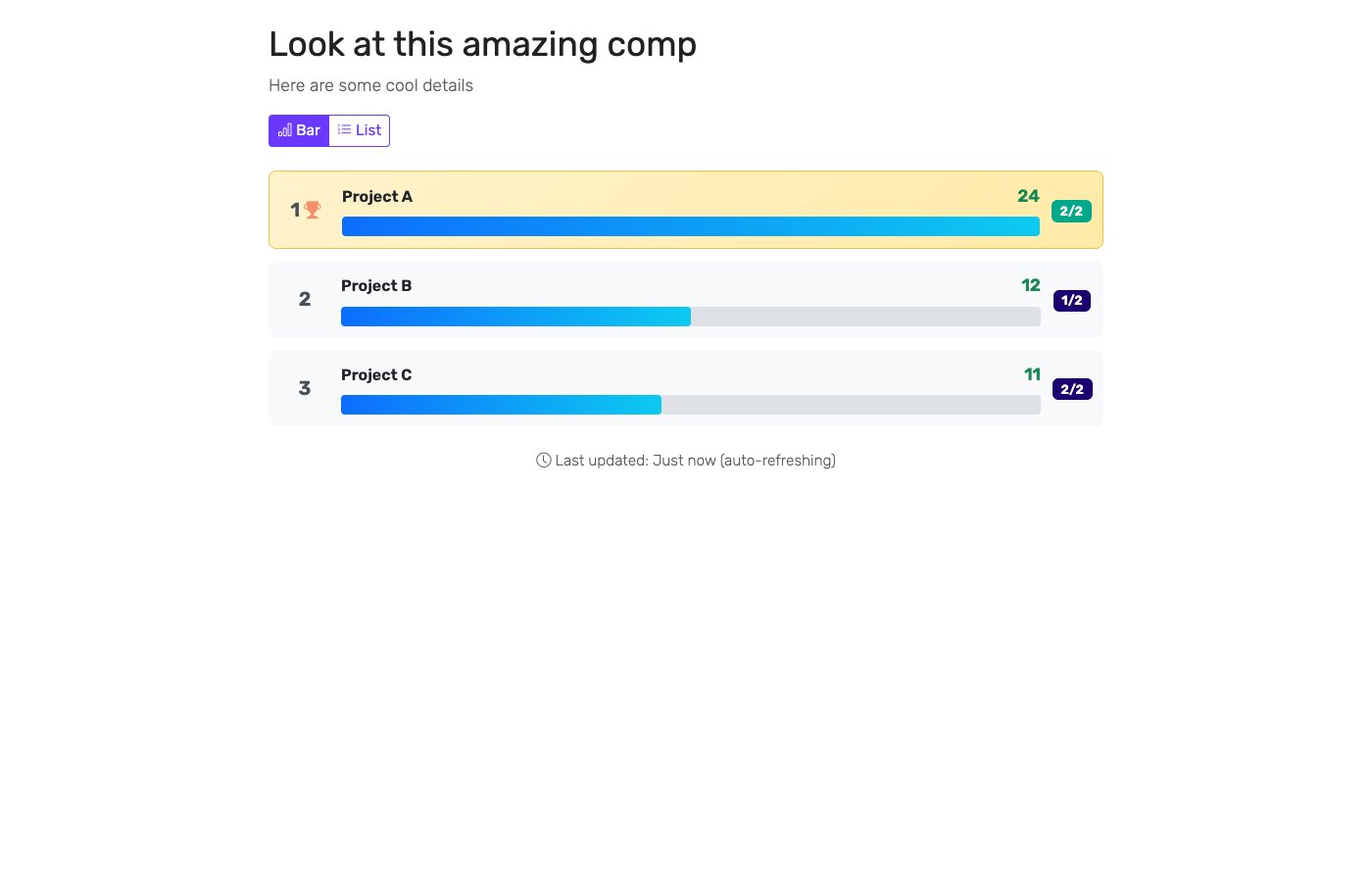
- Display the live leaderboard Open the public leaderboard URL on the demo-room screen. Teams, sponsors, and the audience watch the standings shift as judges submit.
- Announce the winners and export By the last demo, the leaderboard is final. Export the per-judge breakdown for the sponsors, the students, and your own records.
Key features to look for
Not every judging tool fits a hackathon. The features that matter most:
Per-criterion points
Judges score multiple criteria per project, each with its own maximum so technical execution can count more than presentation. A single flat scale alone does not match how hackathons evaluate.
Independent, private judge links
Each judge sees their own scoring view and cannot see the others' scores in progress. Stops anchoring bias, lets judges score at their own pace.
Live leaderboard for the demo room
A URL the demo-room screen can open in full screen. Updates in real time as judges submit, with no manual refresh.
Drop high/low scores
Reduce sponsor-judge or first-time-judge outliers automatically. The tool should support this without manual recalculation.
Works on any device
Sponsors will judge on their phones, students on laptops, mentors on tablets. The tool needs to be browser-based and responsive, with no app install.
Per-judge breakdown export
Sponsors will want to see how their judge scored each team. Students will sometimes question a placement. The tool should keep the per-judge detail and export it.
Who uses hackathon judging software?
Hackathons happen in every corner of tech. The tools earn their keep across the full range:
University and student hackathons
Major League Hacking events, university CS-department hackathons, and student-org events. Often run by undergrads with no licensing budget. A free plan and link-based judging are non-negotiable here.
Corporate and internal hackathons
Quarterly innovation days, "shipathons", and engineering team hackdays. Usually run by an EM, a head of engineering, or an innovation lead. Stakes are higher (executive sponsors, exec audiences) so transparency and a defensible result matter more.
Sponsor and accelerator hackathons
Public hackathons sponsored by tech companies (cloud providers, fintechs, devtools), accelerator pre-batch events, and venture-backed open competitions. Multiple sponsor tracks with different criteria per track is common.
Civic-tech and nonprofit hackathons
Code-for-America-style events, hack-for-good weekends, university public-interest tech competitions. Volunteer organizers, mixed judging panels (technical + community + government).
Virtual and hybrid hackathons
Online-first hackathons with judges on Zoom, distributed teams, and asynchronous demo videos. Each judge gets a link and reviews from wherever they are. Especially useful for global student hackathons that span time zones.
Hackathon judging software vs. Google Sheets and Forms
Most hackathon organizers start with Google Sheets or a Google Form pointing to a spreadsheet. Both work, both eventually fall apart. The comparison:
| Capability | ScoreJudge | Google Sheets / Forms |
|---|---|---|
| Setup time | ✓ ~10 minutes | 30 minutes to a few hours (formulas, locked ranges) |
| Concurrent editing | ✓ Independent judge views | Two judges in the same cell wins is whoever saved last |
| Per-criterion points | ✓ Built in | Custom formulas that break when columns shift |
| Drop high/low | ✓ One toggle | LARGE/SMALL formulas that few people maintain correctly |
| Live leaderboard for the room | ✓ Public URL, full-screen | Publish-to-web (ugly, slow to refresh) |
| Judge onboarding | ✓ Open a link, score | Share the sheet, explain the columns, hope they don't sort |
| Per-judge breakdown | ✓ Stored, exportable | One tab per judge if you set it up that way; usually nobody does |
| Mobile use | ✓ Built for phones and tablets | Sheets on a phone is painful |
| Cost | Free plan covers most events | Free, but the time cost is real |
Sheets and Forms are fine for the first hackathon you ever run. Around the second or third event, the spreadsheet collapses under its own weight and someone re-builds it from scratch. A purpose-built tool short-circuits the cycle.
Hackathon judging criteria
Good hackathon judging criteria are specific enough that two judges scoring the same demo land in roughly the same place, and weighted so the winning project is the one your event actually wants to reward. Most hackathons converge on the same core rubric — technical execution, innovation, impact, design, completeness, and presentation — then adjust the weights to match the theme. A prototyping weekend leans on completeness and demo; a research hackathon leans on innovation and technical depth.
Here is a sample rubric you can copy for a general hackathon:
| Criterion | What judges look for | Weight |
|---|---|---|
| Technical execution | Code quality, technical difficulty, how much actually works versus how much is faked in the demo. | 25% |
| Innovation / originality | Novelty of the idea, creative use of the theme, APIs, or sponsor tools. Would you have thought of this? | 20% |
| Impact / usefulness | Real-world value if shipped, size of the problem solved, strength of the problem-fit. | 20% |
| Design / UX | Clarity and polish of the interface, how intuitive it is, visual and interaction quality. | 15% |
| Completeness | How finished the project is: a working end-to-end flow versus a screenshot and a promise. | 10% |
| Presentation / demo | Clarity of the pitch, how well the team communicated the idea in their allotted time. | 10% |
ScoreJudge lets each criterion carry its own maximum instead of one shared scale, so you can turn the percentages above directly into point ceilings — technical execution out of 25, presentation out of 10, and so on. Raw scores sum into the total, so the ceilings do the weighting for you: a strong score on a 25-point criterion moves the leaderboard more than the same strength of score on a 10-point one. You can add, rename, or re-weight criteria to fit your theme, and every judge scores the same rubric from their own private link.
Why choose ScoreJudge for hackathons
ScoreJudge is competition judging software built for live events — including hackathons. Set up a multi-judge panel with per-criterion points, give every judge a private link, and run a live leaderboard on the demo-room screen. Free plan covers most student and community hackathons; paid plans add more judges and more teams for sponsor-scale events.
What ScoreJudge is used for
Hackathon organizers use ScoreJudge for the full range of formats:
- University and student hackathons. Free plan covers most events, no licensing budget required, sponsor judges score from their phones.
- Internal corporate hackdays and "shipathons". Defensible scoring for events with executive sponsors and stakes attached.
- Sponsor and accelerator hackathons. Multi-track judging with separate criteria per sponsor prize.
- Civic-tech and nonprofit hackathons. Volunteer-friendly setup, mixed-background judging panels (technical + community).
- Virtual and hybrid hackathons. Judges score from anywhere via a link — works for distributed panels and async demo reviews.
- Pitch-style demo days. If your hackathon ends in pitches, see also pitch competition judging for deeper guidance on scoring pitch criteria.
Who uses ScoreJudge for hackathons
ScoreJudge serves every level of the hackathon ecosystem:
- Student organizers running university and MLH-style hackathons on a zero-dollar budget.
- Engineering managers and innovation leads running internal corporate hackdays.
- Developer-relations teams running public sponsored hackathons with multi-track judging.
- Accelerator program managers running pre-batch open competitions and demo days.
- Civic-tech and nonprofit organizers coordinating volunteer judging panels.
- Sponsor judges, mentors, and investors who sit on panels and want to score from their laptop without learning a new tool.
ScoreJudge features for hackathons
Every feature a hackathon organizer needs:
- Per-criterion points: technical execution, originality, impact, presentation — each scored out of its own maximum, however your event scores.
- Drop high/low scores: remove outlier judge bias automatically per project.
- Independent private judge links: no account creation, no app install, no shared editing surface.
- Live public leaderboard: shareable URL, full-screen mode for the demo-room display.
- Per-judge breakdown export: downloadable score detail for sponsors, prize-givers, and any disputed placement.
- Multi-track support: separate brackets and prizes for sponsor tracks (best AI, best fintech, best student team).
- Works on every device: laptops for power judges, phones for sponsors, tablets for mentors.
- Free plan: covers student and community hackathons end-to-end with no per-event fees.
Free accounts cover student hackathons end-to-end. Paid plans add more judges, more teams, and custom branding for sponsor and corporate hackathons.
How to choose the right hackathon judging tool
If you are evaluating tools for a hackathon, weigh these against your event:
- How many teams and judges? Free tiers vary. Confirm the plan covers your panel size and team count for the day.
- Do you have multiple prize tracks? Many hackathons have a "best overall" plus sponsor prizes (best use of AI, best student team). The tool should let you score one set of criteria but cut the leaderboard multiple ways.
- Can judges work in parallel without colliding? Independent private views are essential. Anything that puts judges into a shared document is a future incident.
- Will judges be remote? If yes, the tool has to be browser-based with no install. App-based tools lose half the panel before the demos start.
- Is the leaderboard truly live? The reveal moment in a hackathon is the leaderboard projecting in the demo room. Tools that need manual refresh kill the energy.
- What does it cost per event? Per-event fees in the hundreds of dollars push student hackathons back to spreadsheets. Subscription pricing or a real free plan matters.
For a deeper look at scoring fairness, see how to judge a competition fairly and running competitions with multiple judges. To compare tools across every use case, browse our judging software hub.
Run your next hackathon with ScoreJudge
Set up your judging panel, scoring criteria, and live demo-room leaderboard in about ten minutes. Free plan covers student and community hackathons end-to-end — no per-event fees, no judge logins.
Frequently asked questions
What is hackathon judging software?
Hackathon judging software is a tool that lets a panel of mentors, sponsors, and investors score hackathon projects on shared criteria (technical execution, originality, impact, presentation) from their own laptops or phones, and produces a live, transparent ranking. It replaces the post-demo Google Sheet and the panicked tally before the awards ceremony.
What criteria are used to judge a hackathon?
Most hackathons score on four core criteria: technical execution (how well the project is built, code quality, technical difficulty), originality (novelty of the idea, creative use of the theme or APIs), impact (potential value if shipped, problem-fit), and presentation (clarity of the demo, communication of the idea). Each criterion is typically scored 0–10, and some criteria usually carry more points than others, so technical execution can outweigh presentation.
How does hackathon judging software work?
The organizer adds the teams and the scoring criteria, then sends each judge a private link. During demo presentations, each judge scores the team that just finished on every criterion. The software sums or averages the scores and updates the leaderboard live. By the time the last team finishes presenting, the winners are decided.
Can hackathon judges score remotely?
Yes. Each judge gets a private link they can open from anywhere — at the venue, at their desk, or watching a livestream. There is no app to install and no account to create. ScoreJudge works on any device with a browser, which makes it well-suited to virtual and hybrid hackathons.
Why not just use a Google Sheet for hackathon judging?
Google Sheets work right up until they don't. Two judges editing the same row at once, broken averaging formulas, judges accidentally sorting the sheet and losing their place, and no live audience leaderboard. A purpose-built judging tool removes those failure modes and gives the demo room a live ranking the moment scoring finishes.
Is there a free hackathon judging tool?
Yes. ScoreJudge has a free plan that covers most school, student, and community hackathons end-to-end. There are no per-event fees and no judge accounts to set up — judges just open a link and score.