Drop Score: Exclude Outlier Judge Scores (Olympic Scoring)
Automatically exclude the highest and/or lowest judge score from each entry's total to reduce the impact of any single judge's bias.
Drop Score — sometimes called "Olympic Scoring" — automatically excludes the highest and/or lowest judge score for each entry before totaling. It's the same technique used in figure skating, diving, and gymnastics: no single judge, however biased or mistaken, can single-handedly help or hurt a competitor's result.
This is a Panel Judging feature only — it doesn't apply to Audience Voting or Ranked competitions, since those don't have a fixed panel of named judges.
Enabling Drop Score
Drop Score is off by default. To turn it on:
- Open your competition in the Editor (Edit Competition on the dashboard)
- Scroll down to the Settings card — all its options are explained in Competition Settings
- Toggle Drop Score (Olympic Scoring) on
- Set how many of the highest and lowest scores to drop — 1 and 1 (drop one highest, one lowest) is the default and covers most competitions
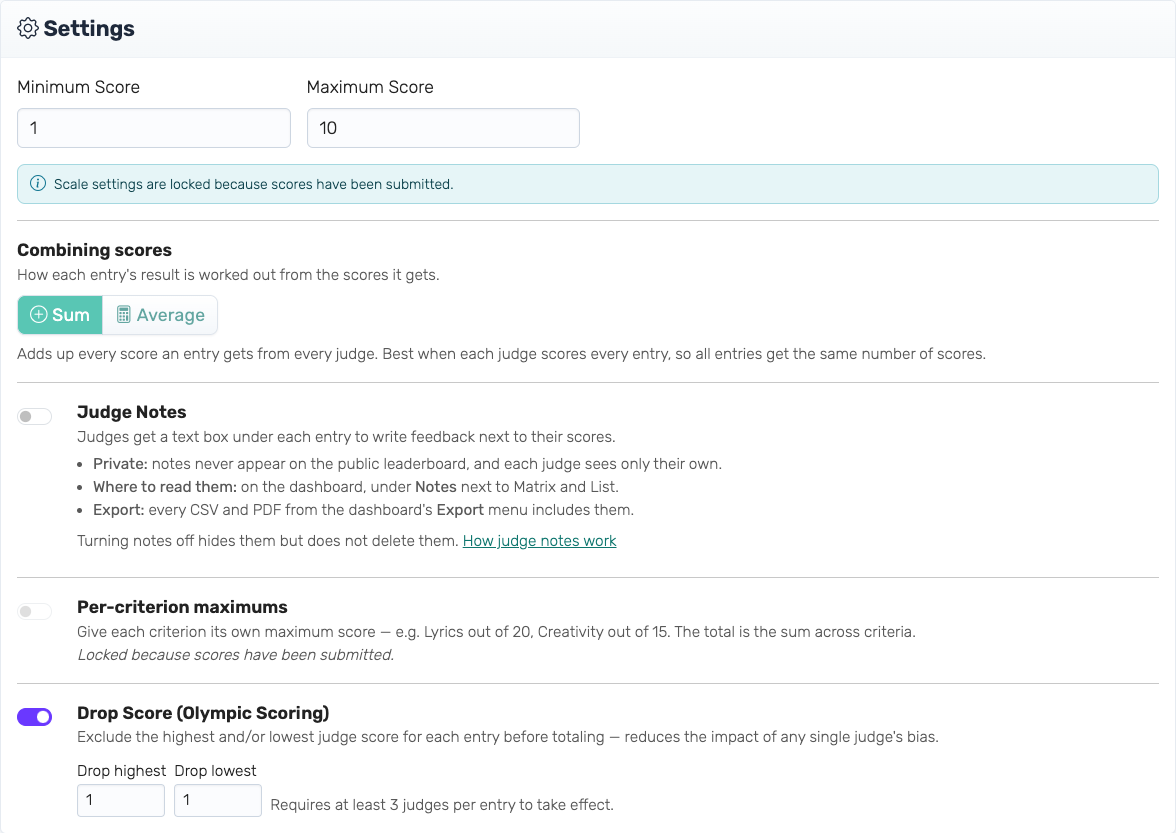
Unlike some other settings, Drop Score can be turned on, off, or reconfigured at any time — even after judges have already submitted scores. It only affects how totals are calculated and displayed; your judges' raw scores are never changed or deleted.
How It Works
For each entry, Drop Score sorts that entry's judge scores from lowest to highest, discards the configured number from each end, and averages or sums whatever's left (following your competition's existing Sum/Average setting).
Example: with "drop 1 highest, 1 lowest" and five judges scoring an entry 12, 16, 2, 18, and 20 — the 2 and the 20 are excluded, leaving 12 + 16 + 18 = 46 as the entry's total (rather than 68 if nothing were excluded).
A judge's "score" for this purpose is their total across every criterion for that entry, not a single criterion in isolation — so if your competition scores Vocals and Stage Presence separately, Drop Score compares each judge's combined score for the entry, not each criterion independently.
Once an entry is trimmed, its per-criterion figures cover only the judges that counted, so the criterion columns still add up to the entry's total.
Ties: if two judges happen to give the exact same highest (or lowest) score, only one of them is excluded — not both. Which one is excluded is consistent every time the leaderboard is recalculated, so you won't see it change on a page refresh.
How many judges do you need? Drop Score needs at least one score left over after dropping, so the minimum is always drop-highest + drop-lowest + 1. With the default of 1 and 1, that's 3 judges. The Editor shows this requirement live as you adjust the counts.
Only judges who have scored every criterion for an entry count toward that minimum. A judge who is halfway through has an incomplete total, and comparing it against finished judges' totals would make them look like the lowest scorer no matter how generously they were actually scoring — so they wait until they're done rather than being dropped for being slow.
What Happens With Too Few Judges
Drop Score is applied per entry, not competition-wide. If fewer judges have finished an entry than the minimum requires (for example, early in judging, before all judges have worked through that entry), its total is shown as the plain, un-trimmed total instead — with a small warning noting how many judges have finished so far. As soon as enough judges have completed that entry, it automatically switches over to the trimmed total.
This means different entries can be in different states at the same time during live judging, and that's expected — it resolves itself as scoring continues.
Viewing Which Scores Were Excluded
On the admin dashboard's Scoring Results, any judge score that was excluded from an entry's total is shown struck through with a highlight, in both the Matrix and List views. Hover over an excluded score for a tooltip confirming it was dropped.
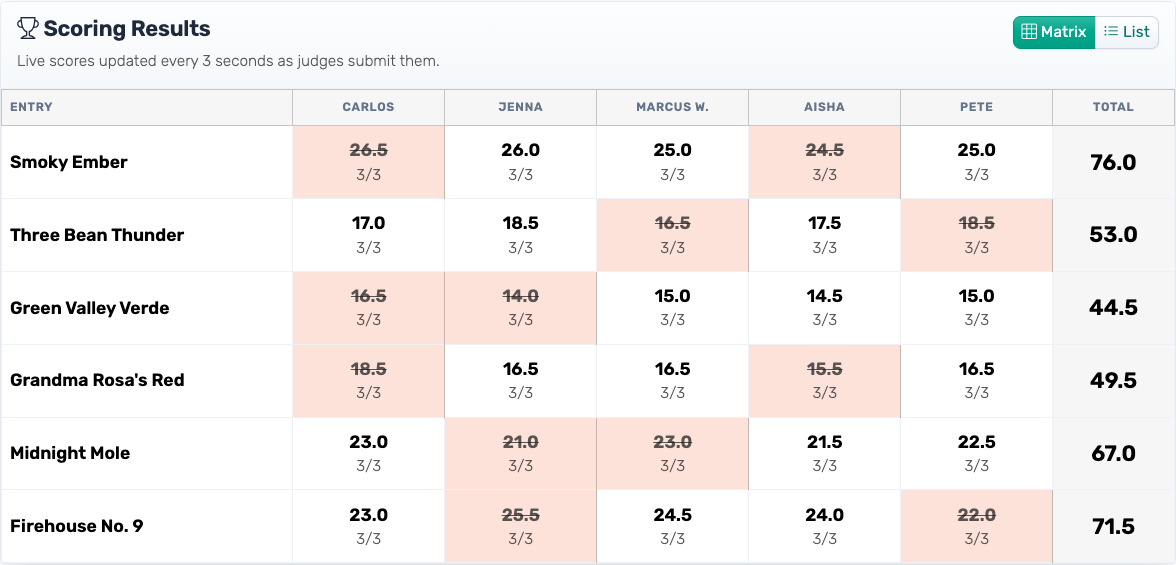
This detail — which judge was excluded — is only visible to you as the organizer. It never appears on the public leaderboard, judges don't see it on their own scoring screens, and it isn't broadcast anywhere else. The public leaderboard only ever shows the resulting total (and, if applicable, the same "not enough judges yet" note described above).
Exporting
When Drop Score is enabled, the results export (the top CSV and PDF in the dashboard's Export menu) adds a "Drop Score Applied" column: Yes for entries where trimming was applied, or No (needs N+ judges to finish) for entries still waiting on enough judges.
The Judges' Votes export gains an "Excluded by Drop Score" column too, marking each judge's row as Yes if their score was excluded from that entry's total, No if it counted, or Not yet applied for entries still showing their un-trimmed total. Like the dashboard, these exports are yours alone — nothing here reaches the public leaderboard or your judges.
Common Questions
Does this change my judges' actual scores?
No. Drop Score only affects the calculated total and what's displayed on the leaderboard. Every judge's original score is stored exactly as submitted and remains visible in the per-judge breakdown.
Can I change the drop counts partway through judging?
Yes. Adjust the counts in the Editor at any time — the leaderboard recalculates immediately using the new settings.
Can I drop only the highest, or only the lowest?
Yes. Set the count you don't want to use to 0 — for example, "drop 0 highest, 1 lowest" excludes only the lowest score. You need to drop at least one of the two.
Do my judges know if their score was excluded?
No — Drop Score is an organizer-facing calculation detail. Judges only ever see the scoring interface; they aren't notified if a particular score of theirs didn't count toward an entry's total.
Does this work with Audience Voting or Ranked competitions?
No, Drop Score is specific to Panel Judging, where you have a known, named set of judges. Audience Voting and Ranked competitions use different aggregation methods.